
Quick Answer
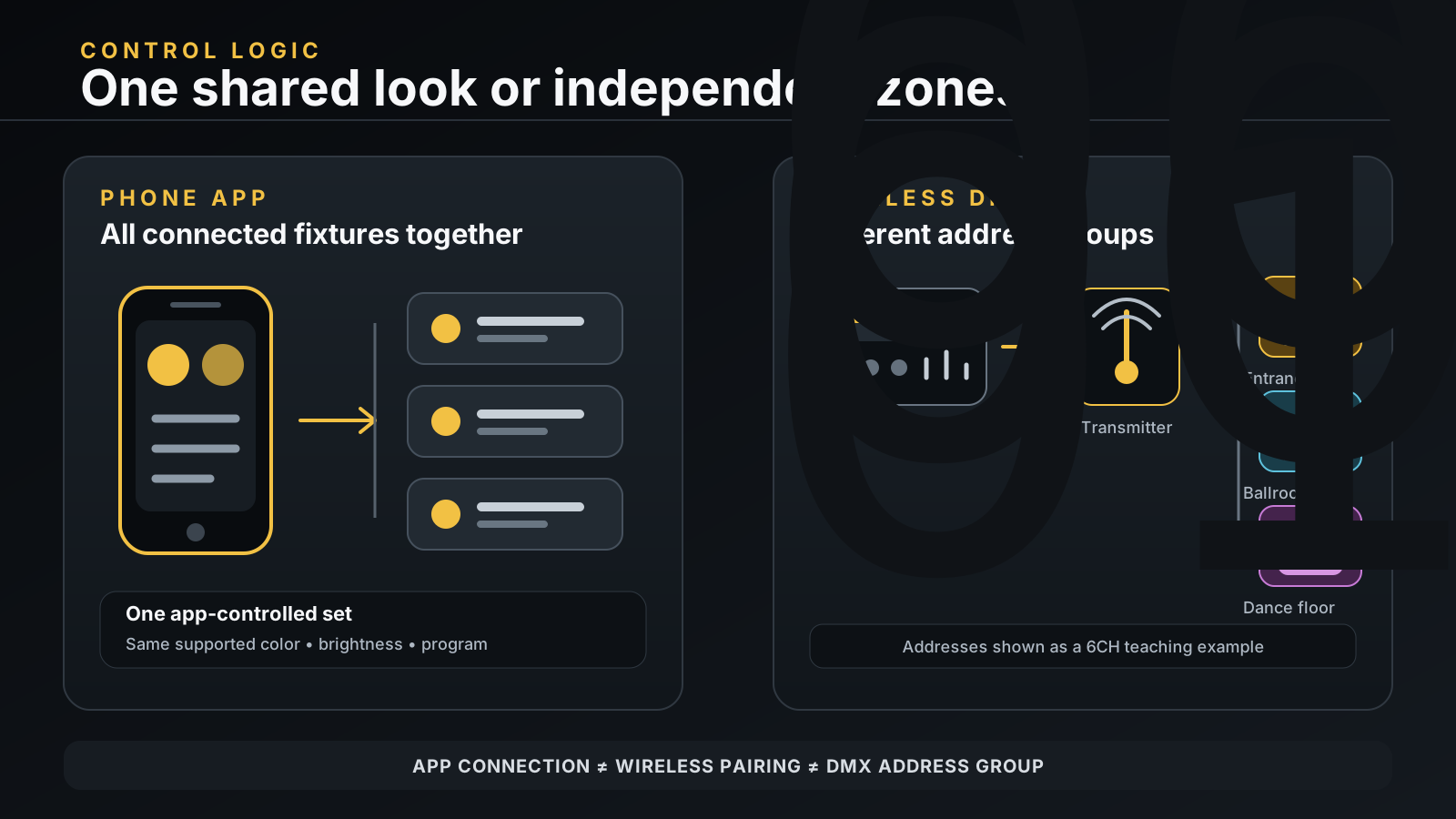
Can you group battery uplights with an app? For the current LumiUp configurations that use the Show Lamp app, you can control connected fixtures together, but you cannot create your own independent groups inside the app. Show Lamp is suitable when all connected lights need the same color, brightness, or built-in program. If the entrance, ballroom, and dance floor must respond independently, use compatible Wireless DMX with a DMX controller or console and assign a separate, non-overlapping DMX address footprint to each control group.
A working wireless link still does not define which fixtures respond together. Verify grouping and control behavior for the quoted model and configuration.
What Does Assigning Groups Mean?
In an event-lighting brief, “group” usually means a set of fixtures that must respond to the same command at the same time. For example, eight uplights at an entrance may stay warm white while twelve ballroom fixtures change between dinner and speeches. A third group around the dance floor may follow music cues.
The requirement is not simply “connect many lights.” It is “control multiple battery uplights as named zones without changing the wrong zone.” If every fixture always shares one look, app control may be enough. If any zone needs its own cue, dimmer, color, or timing, the system needs independent control groups.
Three Different Meanings of Group
Buyers and operators often use the same word for three different layers. Keeping them separate prevents a great deal of setup confusion.
- App connection or device set. This is the collection of fixtures currently reached by the phone app. On the relevant Show Lamp configurations, the app applies color, brightness, or an internal program to the connected fixtures together. It does not provide user-defined independent Group A, Group B, and Group C control.
- Wireless DMX link set. This describes how a transmitter and receiver-equipped fixtures establish the supported radio link. It answers “which receivers are listening to this wireless system?” It does not decide which fixtures share a color or cue.
- DMX address control group. This is the logical group created by the DMX control source and fixture starting addresses. Fixtures with the same compatible personality, channel mode, and starting address can mirror the same data. Different non-overlapping footprints create independent control groups.
An app device set is not a Wireless DMX link set, and neither is automatically a DMX address group. Document each layer separately.
What App Control Is Best For
App-controlled battery uplights are useful when the operator wants one color, shared brightness, or the same built-in program across connected fixtures. That can suit a small room, a showroom demonstration, or an area where every uplight is intentionally synchronized.
Do not ask only whether a light has app control. Ask whether its current Show Lamp configuration can create user-defined independent groups. For the related LumiUp configurations discussed here, it cannot. A screen showing several connected devices is not evidence of separate zone control.
If you are still choosing a control method, the Wireless DMX vs App Control guide explains the broader workflow differences. This article focuses on the narrower grouping decision.
Why Independent Groups Usually Require Wireless DMX
Independent zones require different values at different DMX address ranges. A compatible DMX control source provides those values, a wireless transmitter carries them to receiver-equipped fixtures, and each fixture reads the slots beginning at its starting address. The source may be a hardware console, a compatible controller, or a software system that outputs the correct DMX data to the transmitter.
The signal path is:
DMX control source → compatible Wireless DMX transmitter → fixture receivers → DMX address groups
Wireless transmission removes the control cable between compatible transmitters and receivers; it does not replace the DMX patch or fixture addresses. The control source determines what each group does, and the address plan determines which fixtures follow it.
“2.4G” alone does not establish interoperability. Use the Wireless DMX Compatibility Guide to check the control path, then follow the Wireless DMX Setup & Troubleshooting for Multi-Zone Events guide when preparing the venue.
How DMX Address-Based Grouping Works
A DMX starting address tells a fixture where to begin reading control data. Its selected channel mode determines how many consecutive slots it occupies. A fixture in 6CH mode starting at 001 uses slots 001 through 006. The next non-overlapping 6CH footprint can begin at 007.
When several same-model fixtures must respond in sync, set them to the same DMX channel mode and starting address, then patch the matching fixture personality on the DMX control source. They will read the same slots. Use this only when those fixtures should mirror one another.
For independent groups, assign a different starting address to each group and make sure the complete footprints do not overlap. The rule is:
Next starting address = current starting address + number of channels in the selected mode
6CH Address Table — Teaching Example Only
Swipe horizontally to view the complete 6CH address example.
| Independent zone | Starting address | 6CH footprint | Next available address |
|---|---|---|---|
| Entrance group | 001 | 001–006 | 007 |
| Ballroom group | 007 | 007–012 | 013 |
| Dance-floor group | 013 | 013–018 | 019 |
This table is only a teaching example for 6CH mode. Do not copy these starting addresses into an 8CH, 10CH, or any other channel mode. Recalculate every footprint from the selected mode and match the controller personality to it. A mode change can affect every address that follows.
The LumiUp Aqua P4RX product page is a verified example: its published control list includes a Wi‑Fi mobile app, built-in 2.4G Wireless DMX receiver/transmitter, and 6/8/10-channel modes. These facts support the address-planning example, but do not establish custom Show Lamp groups, compatibility with an unnamed protocol, radio range, device capacity, or connection-loss behavior. Check required functions against the quoted configuration.
App Control vs Wireless DMX Selection Table
Use this table to choose how the fixtures need to behave, not merely which interface sounds easier.
Swipe horizontally to compare both control workflows.
| Control requirement | Show Lamp app on relevant current configurations | Wireless DMX with compatible DMX control source |
|---|---|---|
| Apply one color to all connected fixtures | Suitable | Suitable when patched as one shared-address group |
| Change shared brightness or built-in program | Suitable for supported app functions | Possible when the fixture personality exposes the required controls |
| Control entrance, ballroom, and dance floor independently | No user-defined independent groups | Use separate, non-overlapping DMX address groups |
| Run a planned sequence of different zone cues | Not the intended grouping workflow | The DMX control source can address each patched zone independently |
| Mirror multiple same-model fixtures | Connected fixtures can receive the same app change | Use the same mode and starting address for the intended mirrored group |
| Operate without a hardware DMX console | Yes, for the supported common app controls | Possible when a compatible controller or software system outputs the correct DMX data |
| Main pre-purchase check | App functions for the quoted configuration | Controller personality, channel mode, address plan, and transmitter/receiver compatibility |
This grouping-workflow table does not promise every listed control on every model.
Common Group-Control Mistakes
- Treating every connected app fixture as a selectable group. Connection shows reachability; it does not prove the app can split fixtures into independent zones.
- Using wireless pairing as the zone plan. A receiver can share a working radio link while using a different DMX address. Pairing transports data; addresses organize control.
- Giving independent zones the same starting address. Matching fixtures in the same mode will mirror when they read the same slots. That is useful for one synchronized group, not for separate zones.
- Allowing address footprints to overlap. A start address can look different while still occupying slots used by the preceding fixture. Calculate the full footprint, not just the first number.
- Changing from 6CH to 8CH or 10CH without repatching. The following group addresses and controller personality must change with the selected mode.
- Mixing models or modes under one shared address without checking personalities. The same DMX slot can control a different attribute on another model or channel mode.
- Buying on the words “app” or “2.4G” alone. Those labels do not answer group creation, protocol compatibility, DMX patch, range, capacity, or connection-loss behavior.
Questions to Ask Before Buying
Give the supplier a zone plan and ask for answers tied to the exact quoted configuration:
- Which fixture model and app configuration will be supplied?
- Does that Show Lamp app offer user-defined independent groups, or only common control of connected fixtures?
- Which colors, dimmer controls, and built-in programs are available in the app?
- Which Wireless DMX transmitter and protocol are supported by the receiver configuration?
- Which channel mode and controller personality match, and how many channels does each fixture occupy?
- Can representative fixtures be tested with the intended DMX control source, transmitter, and three-zone patch?
- What supported recovery method applies if the normal control path is interrupted?
Record the answers in the purchase specification. A short bench test with the real control equipment is more useful than a generic claim about wireless control.
Frequently Asked Questions
Can the Show Lamp app create custom groups of LumiUp battery uplights?
For the current related LumiUp configurations covered here, no. Show Lamp can apply supported color, brightness, and built-in program controls to connected fixtures together, but it cannot create user-defined independent light groups.
Can multiple battery uplights share one DMX starting address?
Yes, when same-model fixtures use the same DMX channel mode and are intended to respond together. They read the same slots and operate as one mirrored control group. Do not share an address when the fixtures need independent cues.
Are Wireless DMX pairing groups the same as DMX address groups?
No. Wireless pairing establishes the supported radio link between transmitter and receivers. DMX address groups determine which fixtures respond to particular controller data. A valid wireless link does not correct a wrong address, channel mode, or controller personality.
What address comes after 001 in 8CH or 10CH mode?
Apply the channel-count rule to the selected mode: add the number of occupied channels to the current starting address. Do not use the 6CH table above for an 8CH, 10CH, or other mode. Recalculate the complete footprints and update the controller patch.
Do I need a DMX console for three independent uplighting zones?
Not necessarily. Independent zones need a compatible DMX control source. It can be a hardware console, or a compatible controller or software system that outputs the correct DMX data to the Wireless DMX transmitter. The app alone does not create those independent Show Lamp groups.
Does the Aqua P4RX support app control and Wireless DMX?
Its current product page lists Wi‑Fi mobile app control, a built-in 2.4G Wireless DMX receiver/transmitter, and 6/8/10-channel modes. The page does not publish custom app-grouping, range, device-capacity, or connection-loss specifications.
Plan Your Control Groups Before Ordering
Start with a simple zone schedule: name each area, list the fixtures that must mirror, choose the required channel mode, calculate non-overlapping address footprints, and identify the DMX control source and compatible wireless path. Then decide whether common app control is sufficient or the project needs multi-zone control through DMX.
Compare the current LumiUp products, then use the Contact/RFQ page to tell us the model or application, approximate quantity, number of independent zones, indoor or outdoor use, and any DMX controller or transmitter you already use. LumiUp can then help confirm the suitable control workflow, channel mode, and address plan for the quoted configuration.