
*Updated: August 23, 2026 (Asia/Shanghai)*
Quick Answer
Wireless DMX battery uplights are compatible only when the controller path, transmitter, radio protocol, receiver role, universe, DMX address, and fixture mode all match. Battery power removes a power cable; it does not prove that a fixture receives DMX wirelessly. Check the exact protocol and hardware at both ends, then document a supported fallback before the equipment reaches the venue.
Key Takeaways
- Battery operation and wireless data control are separate capabilities.
- A shared 2.4 GHz frequency does not make two wireless DMX systems compatible.
- “Built-in wireless DMX” is incomplete unless the protocol and receiver role are identified.
- RDM works only when every relevant part of the control path supports the required bidirectional communication.
- Check the model-specific fallback because wired DMX, IR, or standalone programs are not universal.
Table of Contents
- Battery Powered Does Not Automatically Mean Wireless DMX
- How DMX, RDM and Wireless DMX Work Together
- Wireless DMX Battery Uplights: Protocols Are Not Automatically Compatible
- Will a CHAUVET D-Fi Transmitter Work with a Battery Uplight?
- Receiver vs Transmitter vs Transceiver
- Seven Questions to Check Before Connecting a Fixture
- Basic Connection Workflow
- Fallback Control Matters
- What to Verify on the LumiUp Flex PL18 Pro
- Pre-Purchase Compatibility Checklist
- Frequently Asked Questions
Battery Powered Does Not Automatically Mean Wireless DMX
A battery-powered fixture stores the energy needed to produce light. Wireless DMX carries control data without a DMX cable across part of the signal path. These solve different cable problems, and either feature can exist without the other.
Four functions are commonly blended together in product descriptions:
- Battery power replaces the fixture’s temporary mains-power connection while the battery has usable charge.
- Wireless data carries control instructions over a supported radio system.
- Infrared control uses a handheld remote and normally requires line-of-sight, short-range operation.
- Standalone operation runs colors, fades, sound-active behavior, or other built-in programs without a live console.
All four can reduce visible cabling or make a light look “wireless.” A battery powered light with wireless DMX has both energy storage and a compatible radio receiver. A battery-powered light with only onboard presets has no live wireless DMX link. A mains-powered wireless DMX wash light can receive data over radio while still needing a power cable.
Treat “wireless” as a question, not a complete specification. Ask whether it describes power, DMX data, an app, IR, or a standalone program.
How DMX, RDM and Wireless DMX Work Together
DMX512 sends level data from a controller to lighting equipment. A fixture occupies one or more control slots according to its DMX mode and starting address. The current ANSI E1.11 document and other ESTA-published DMX and RDM standards provide the formal references.
RDM, or Remote Device Management, adds bidirectional communication over a DMX512 data link. When the controller, distribution path, and device support it, RDM can help discover equipment, set a starting address, and report status or faults. RDM lighting control is not automatic just because ordinary DMX levels pass through a system.
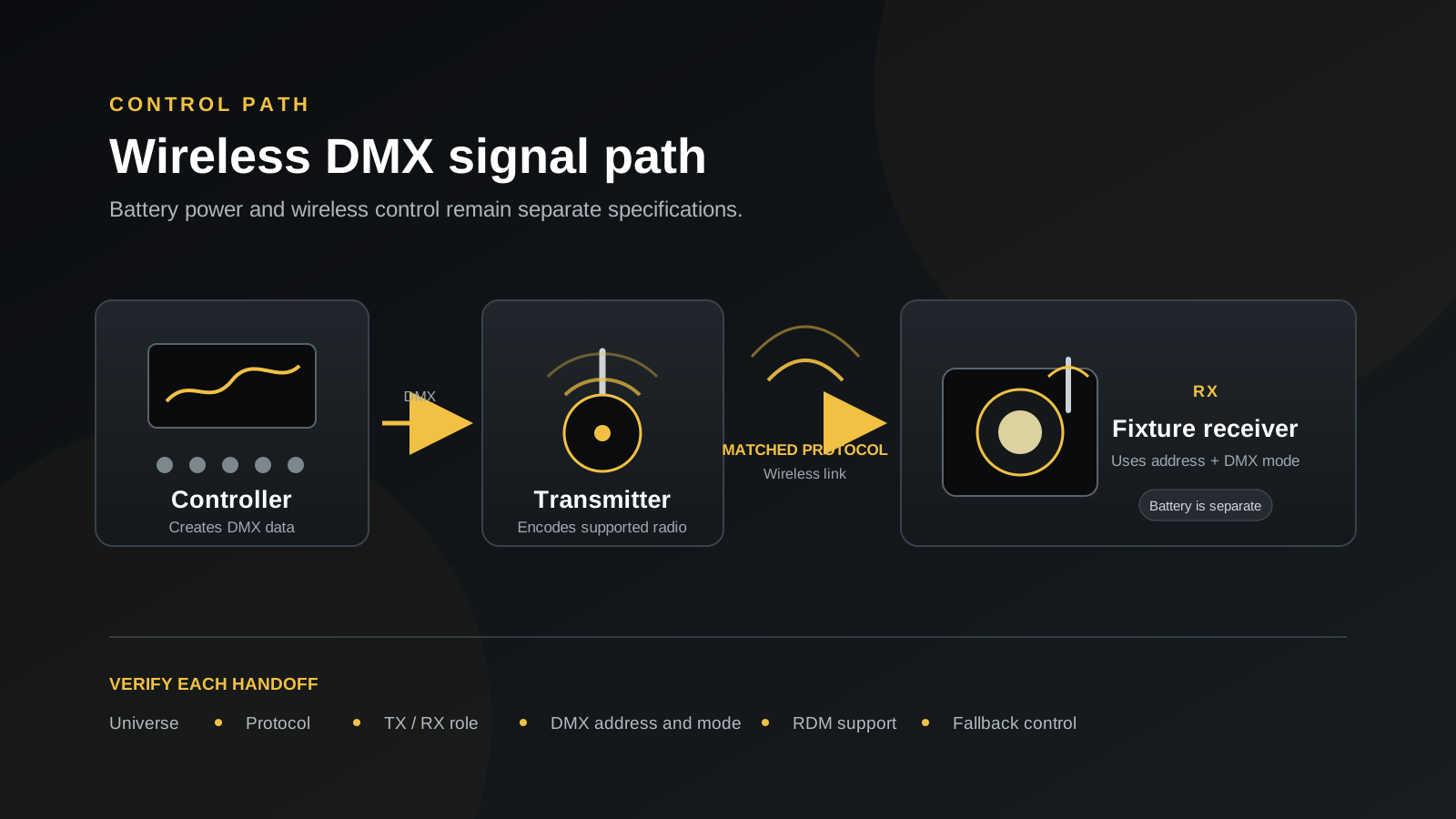
Wireless DMX usually replaces one cable segment. The console still creates DMX data. A transmitter converts that data for a supported radio link. A receiver at or inside the fixture converts the radio transmission back into control data the fixture can use. Addressing, DMX mode, universe planning, and console programming still apply.
Radio transport does not replace the control system. It replaces a compatible part of the data path.
Wireless DMX Battery Uplights: Protocols Are Not Automatically Compatible
“2.4 GHz wireless DMX” describes a frequency band and a purpose, not one universal language. Products may use a manufacturer-specific system, Wireless Solution technology, LumenRadio CRMX, or hardware supporting more than one documented protocol. Devices in the same band can still use different pairing, timing, encoding, or network behavior.
W-DMX vs CRMX is therefore not a choice between two labels for every 2.4 GHz link. They are specific technology ecosystems. LumenRadio identifies CRMX as its patented wireless DMX technology, while the Wireless Solution product site documents its own transmitter and receiver products. A device must explicitly state the protocol, compatible mode, and role before interoperability can be expected.
Some products offer documented cross-protocol modes. That capability belongs to the exact hardware and firmware; never infer it from the antenna, frequency, or words “wireless DMX.”
Swipe horizontally to compare all columns.
| Fixture protocol statement | Transmitter requirement | Receiver requirement | Compatibility confirmation |
|---|---|---|---|
| Named protocol and version or mode | Same supported protocol and mode | Built-in or external RX for that mode | Check both manuals and current firmware notes |
| Generic or proprietary 2.4 GHz DMX | Matching manufacturer-approved transmitter | Matching receiver implementation | Obtain an explicit compatibility list or perform a controlled test |
| Multi-protocol radio | Select a transmitter mode named by the fixture maker | Select the same receiving mode | Confirm mode switching, pairing, and any feature limits |
| “Wireless DMX” with no protocol | Protocol detail required | Protocol detail required | Do not mix systems until protocol documentation or a controlled compatibility test is available |
Will a CHAUVET D-Fi Transmitter Work with a Battery Uplight?
A CHAUVET wireless transmitter can control a battery uplight directly only when the fixture has a receiver that explicitly supports the same D-Fi system and operating mode. A fixture described only as “2.4GHz wireless DMX” is not automatically D-Fi compatible. A separate D-Fi XLR receiver may provide another route for fixtures with a compatible wired DMX input, but the exact hardware must be checked and tested.
CHAUVET documents the D-Fi Hub 2 as a D-Fi transmitter/receiver for D-Fi-ready devices, the D-Fi XLR TX as a transmitter, and the D-Fi XLR RX as a receiver that connects to a DMX-compatible fixture’s XLR port. Its D-Fi USB 2 is a proprietary transceiver powered by the USB port of a compatible CHAUVET DJ fixture. These distinct roles are why the exact model and complete signal path matter.
First Identify the Exact CHAUVET Transmitter
“CHAUVET wireless transmitter” is not a complete model identification. A buyer might mean a D-Fi Hub or D-Fi Hub 2, D-Fi XLR TX, FlareCON Air or FlareCON Air 2, or D-Fi USB or D-Fi USB 2. This list gives examples only; it does not identify the customer’s hardware.
Ask the buyer to provide:
- Exact model name.
- A clear photograph of the product label.
- D-Fi channel or operating mode.
- DMX connector type.
- Controller or console feeding the transmitter.
- Current firmware and manual, where applicable.
Three Possible Compatibility Paths
Swipe horizontally to compare all compatibility paths.
| Customer’s equipment | Fixture-side requirement | Likely path | Approval status |
|---|---|---|---|
| CHAUVET D-Fi transmitter | Built-in receiver explicitly documented as D-Fi compatible | Direct wireless connection may be possible | Verify both manuals and test the exact units |
| CHAUVET D-Fi transmitter | Fixture lists only generic 2.4GHz wireless DMX | Native connection is not proven | Do not promise compatibility |
| CHAUVET D-Fi transmitter plus D-Fi XLR RX | Fixture has a compatible wired DMX input | External receiver may convert the D-Fi link back to wired DMX | Verify connector, pinout, channel mode and a representative sample |
| CHAUVET D-Fi transmitter | Fixture documented only for W-DMX, CRMX or another named ecosystem | Different wireless protocol | Treat as incompatible unless explicit multi-protocol support is documented |
For buyers searching for Chauvet D-Fi compatible battery uplights, the first path requires model-level documentation for the built-in receiver. The third path is an external-receiver option, not proof that the fixture’s native wireless radio supports D-Fi.
What We Need Before Recommending a LumiUp Fixture
Sales or technical staff should record:
- The exact CHAUVET transmitter model and a label photograph.
- The LumiUp fixture model being considered.
- The required DMX channel mode.
- Whether a native wireless connection is mandatory.
- Whether an external D-Fi XLR receiver is acceptable.
- The connector type and pinout.
- The number of fixtures and required universe.
- The result of a representative-sample compatibility test.
Apply these approval rules:
- Do not approve compatibility from “2.4GHz” alone.
- Do not relabel LumiUp’s generic 2.4GHz wireless DMX as CHAUVET D-Fi.
- Until model-level documentation or an exact-hardware test is complete, record the status as compatibility unconfirmed.
- Wired DMX512 control does not prove that a fixture’s built-in wireless receiver supports D-Fi.
- Do not claim that any LumiUp model has official CHAUVET certification without verifiable evidence.
Receiver vs Transmitter vs Transceiver
Radio direction matters as much as the protocol. An RX-only fixture listens for control data. A TX device sends the wireless stream. A transceiver can perform either role when the product supports and is configured for it.
Swipe horizontally to compare all device roles.
| Device role | Abbreviation | What it does | Typical position |
|---|---|---|---|
| Receiver | RX | Receives the wireless control stream | Inside a fixture or connected to its DMX input |
| Transmitter | TX | Sends control data into the wireless link | Connected to a console, node, or other DMX source |
| Transceiver | TX/RX | Can be configured to transmit or receive | At either end, subject to the selected role |
“Built-in wireless DMX” still leaves essential questions unanswered. It does not say whether the fixture is RX-only or a transceiver, which protocol it understands, whether RDM returns through the link, how many universes the hardware handles, or which transmitter is approved.
Seven Questions to Check Before Connecting a Fixture
- What wireless protocol does the fixture use? Record the exact name, supported mode, and any firmware condition. “2.4 GHz” alone is insufficient.
- Is the radio a receiver or a transceiver? An RX-only battery uplight cannot send console data to other receivers. A transceiver must be placed in the correct role.
- Which transmitter is required? Match the fixture documentation to a named transmitter, integrated console radio, or approved external unit. Confirm connector type and the source feeding it.
- How many universes are supported? A universe is one DMX512 data set. Establish whether the transmitter, radio link, and receiver arrangement carries the required universe or universes without guessing from fixture quantity.
- Does the complete path support RDM? Check the controller, transmitter, receiver, distribution hardware, fixture, and selected wireless mode. Ordinary DMX operation does not prove an RDM return path.
- How are devices unlinked and paired again? Obtain the model-specific procedure, indicator meanings, and reset behavior. This matters when equipment moves between kits or arrives linked to another transmitter.
- What supported fallback remains if the wireless link is unavailable? Verify wired DMX, local menu control, presets, IR control, or another documented method for the exact fixture.
Record the answers beside the model and firmware. Similar housings can contain different radio modules, and later production hardware may not behave like an earlier sample.
Basic Connection Workflow
A compatibility-level wireless uplight setup follows one clear signal path:
- Console or controller: Build the required universe data, patch the fixture, and select its documented DMX mode.
- Transmitter: Feed the control output to a transmitter that supports the receiver’s exact protocol and mode.
- Wireless link: Select the documented link, pairing, or network settings. Keep protocol settings consistent at both ends.
- Fixture receiver: Put the built-in or external receiver in RX mode and confirm the manufacturer-defined linked indication.
- DMX address and mode: Set the fixture’s starting address and DMX mode to match the console patch, then test the intended attributes.
This checks logical compatibility; it does not replace the product manual or a representative pre-event test.
After the protocol and receiver path are confirmed, use the wireless DMX setup and troubleshooting checklist to plan transmitter placement, addressing, multi-zone tests, and recovery on site.
Fallback Control Matters
A fallback is useful only when the fixture actually supports it and the crew can activate it under event conditions.
- Wired DMX can preserve console control when a supported input and suitable data route are available.
- Manual menu control may hold a static look without an external controller.
- Preset or automatic programs can provide a pre-agreed scene when live data is unnecessary.
- IR control may allow simple local changes if the model includes a compatible remote and the fixture is accessible.
Confirm behavior after signal loss. A fixture may hold its last state, fade, black out, or enter a program according to its configuration. Document the exact model’s controls, pre-program the approved backup look, and assign responsibility for switching.
What to Verify on the LumiUp Flex PL18 Pro
The current LumiUp Flex PL18 Pro record describes LU-FXPL18X as an 18 × 20W IP65 battery LED panel for stage, film, television, outdoor event and creative temporary production lighting. It publishes a 24,000mAh battery, mode-dependent runtime from three to eighteen hours, DMX512, built-in 2.4GHz wireless DMX, app and infrared control.
The published 2.4GHz description does not name an interoperable radio ecosystem such as W-DMX or CRMX, and it does not establish RDM support, universe limits or signal-loss behavior. This guide therefore does not infer cross-brand compatibility from the frequency alone.
Swipe horizontally to compare all verification items.
| Area | Confirmed specification | What to confirm |
|---|---|---|
| Identity | LumiUp Flex PL18 Pro, model LU-FXPL18X | Final quoted production configuration |
| Format | 18 × 20W RGBWA+UV IP65 battery LED panel | Final optics, mounting and approved configuration |
| Power | 24,000mAh rechargeable battery; published mode-dependent runtime of 3–18 hours | Runtime test conditions, charger and operating reserve |
| Applications | Stage, film/television, outdoor event and creative production lighting | Project environment and operating requirements |
| Control | DMX512, built-in 2.4GHz wireless DMX, app and infrared control | Named radio protocol, RX/TX role, transmitter, universes, RDM, pairing and signal-loss behavior |
| Fallback | Wired DMX, infrared and standalone control are listed | Priority between control sources and the approved recovery procedure |
Before specifying control, request a current channel chart or manual for the selected configuration and test it with the intended transmitter.
Pre-Purchase Compatibility Checklist
- [ ] Record the fixture model, hardware revision, and firmware.
- [ ] Separate battery operation from wireless DMX capability.
- [ ] Name the exact wireless protocol and supported mode.
- [ ] Confirm whether the fixture radio is RX-only or a transceiver.
- [ ] Identify the approved transmitter and required adapter or connector.
- [ ] Map each required universe and fixture address.
- [ ] Match the console patch to the fixture’s published DMX mode.
- [ ] Verify RDM across the complete path if it is required.
- [ ] Document unlink, reset, and re-pairing steps.
- [ ] Confirm behavior after signal loss.
- [ ] Select a model-supported fallback and rehearse the changeover.
- [ ] Test a representative fixture and transmitter before finalizing the system.
For this model, review the Flex PL18 Pro control specifications, then test the exact fixture, channel mode and transmitter configuration together.
Frequently Asked Questions
Are all 2.4 GHz wireless DMX systems compatible?
No. Devices can share 2.4 GHz while using different radio formats, pairing, or network behavior. Confirm the named protocol and mode at both ends. If documentation is generic, obtain a compatibility list or test the exact hardware.
Is wireless DMX the same as Wi-Fi?
No. Wireless DMX describes the transport of DMX lighting-control data over a radio system. Wi-Fi is a networking technology that some apps, nodes, or controllers may use. A fixture can offer one, both, or neither, and the presence of a 2.4 GHz radio does not make the terms interchangeable.
Can one transmitter control multiple battery uplights?
Often, a compatible transmitter can send one universe to multiple linked receivers, but topology and limits depend on the system. Confirm the documentation, protocol, universe plan, receiver roles, and fixture addresses. One successful fixture does not prove an unlimited count.
What is the difference between a receiver and a transceiver?
A receiver listens for a wireless control stream. A transceiver can be configured to transmit or receive when its design and selected mode support both roles. The word “transceiver” does not mean it performs both jobs at the same time, so check the product’s operating modes.
Does RDM work over every wireless DMX system?
No. RDM requires bidirectional support across the relevant path. The console, transmitter, receiver, wireless mode, distribution hardware, and fixture must handle it. Successful one-way DMX does not prove discovery, addressing, or status reporting will return.
Can wireless and wired DMX be used as fallback options?
They can be complementary when the exact fixture and system support the intended switching method. Confirm the fixture’s physical inputs, wireless behavior, data priority, and signal-loss settings. Test the changeover before the event so two control sources do not create an undocumented conflict.
Does battery operation guarantee built-in wireless DMX?
No. The battery supplies energy to the light; it does not define the control interface. A battery fixture may use wired DMX, an onboard menu, presets, IR, app control, wireless DMX, or a combination. Only the exact model’s published control specification can confirm what is built in.
Can a CHAUVET D-Fi transmitter connect directly to any 2.4GHz wireless DMX fixture?
No. The shared frequency band does not establish protocol compatibility. The fixture must explicitly support the same D-Fi system and mode, or use a documented compatible receiver.
Can I use a CHAUVET D-Fi XLR receiver with a LumiUp battery uplight?
It may be possible when the selected fixture has a compatible wired DMX input, but the connector, pinout, DMX mode and complete signal path must be verified. Request a test using the exact transmitter, receiver and fixture before ordering a fleet.
Confirm the Signal Path Before the Event
Compatibility becomes manageable when every handoff is named: controller, universe, transmitter, protocol, receiver role, address, DMX mode, and fallback. Keep those details with the equipment list, and repeat the check whenever hardware or firmware changes.