
Introduction: Why Swappable Battery Design Matters
For event production teams, rental companies and venues, choosing swappable battery uplights means specifying a complete system: fixtures, installed packs, extra batteries and charging equipment. Start with the event schedule, then check exactly what the quotation includes.
Quick Answer
A swappable battery uplight accepts an approved replacement pack between event runs. Verify separate charging support, and price extra packs and approved charging equipment as distinct line items. Swappable does not mean hot-swappable: follow the model’s required power-off procedure. An open battery bay is not the fixture’s IP-rated operating configuration.
Key Takeaways
- Treat “swappable” as a purchasing description; the model’s documented procedure governs use.
- Quick-change describes access and handling, not permission to replace a live battery.
- Specify fixtures, spare packs and charging equipment as separate order items.
- Size reserves against overlapping bookings and recharge deadlines, not a universal percentage.
- Verify outdoor configuration and wireless compatibility independently of the battery design.
What Is a Swappable Battery Uplight?
With a swappable battery LED uplight, buyers can plan spare energy separately from spare lighting hardware. A removable battery LED PAR may support routine crew exchange, or its battery may be accessible only for technician service. The model’s instructions determine which arrangement you are buying.
This guide covers system selection, configuration and quotation checks. For P4RX replacement steps, warehouse workflow and detailed inspection, use How Removable Battery Packs Reduce Uplight Downtime.
Integrated, Removable, Quick-Change and Hot-Swappable Batteries
These terms answer different questions. They should not be treated as interchangeable specifications on a quotation.
Swipe horizontally to compare the battery terms and required evidence.
| Term | What it describes | What the buyer must establish |
|---|---|---|
| Integrated or built-in | Battery normally stays in the fixture during charging and use | Service replacement arrangements and fixture charging access |
| Removable | Pack can be taken out using an approved procedure | Crew access versus technician service; separate charging support |
| Swappable | Approved packs can be exchanged for planned reuse | Exact pack compatibility, replacement sequence and available spares |
| Quick-change | A mechanism intended to simplify pack access | Required tools, handling space and total return-to-service time |
| Hot-swappable | Manufacturer-authorized exchange while the equipment remains operating | Explicit live-replacement support and any interruption or output limits |
A quick-change battery uplight may still need to be switched off, repositioned and checked before use. Ask whether settings persist after a power cycle and whether wireless control reconnects as expected. If an uninterrupted lighting cue is essential, a powered-off exchange cannot meet that requirement by itself.
Listings for replaceable battery uplights can be similarly broad. Confirm whether replacement means routine crew exchange or eventual service after battery wear. The wording on a sales page cannot substitute for an operating instruction tied to the exact model.
Why Event Crews Choose Swappable Battery Packs
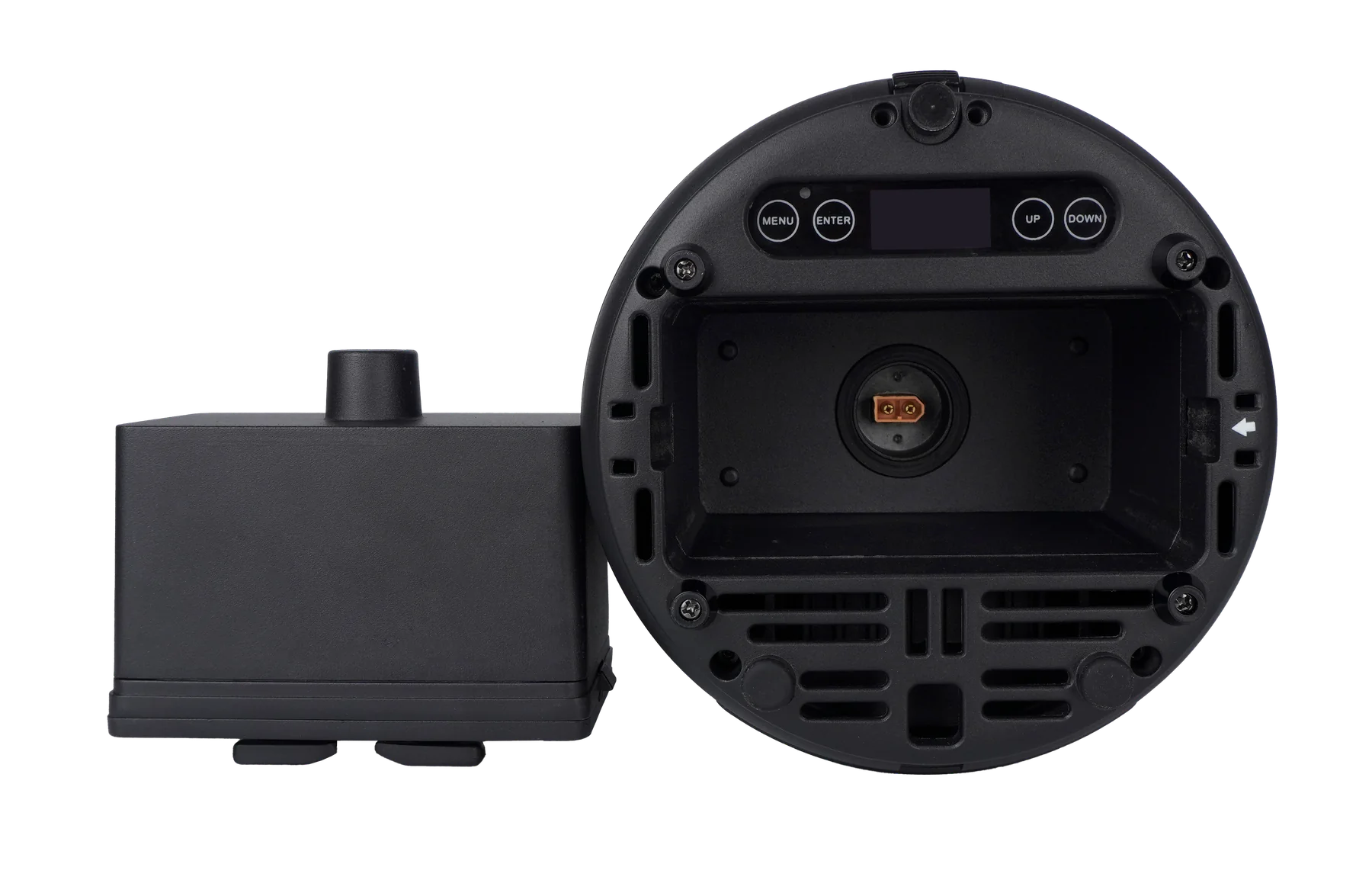
The purchasing advantage is flexibility between jobs. A venue with a daytime conference followed by an evening reception may have time to change approved packs but insufficient time to recharge the same set. A rental operation may also need charged inventory at several dispatch locations.
That flexibility has a cost: additional packs, chargers, transport protection and staff time. Compare the full system cost with the cost of additional integrated-battery fixtures. Extra packs address energy availability; they do not replace a spare fixture when optics, controls or housing need service.
What to Check Before Buying
Request a written configuration sheet for the fixture, battery and charging equipment. A useful supplier response should identify components by model or part number and distinguish included items from optional accessories.
- Battery identity: Approved pack number, voltage, energy rating, connector and supported fixture revisions; obtain the manufacturer’s values rather than estimating from size.
- Replacement conditions: Required power state, tools, access clearance, retention mechanism and authorized operator.
- Charging specification: Approved charger, electrical input, charge-completion indication, temperature conditions and verified recharge time from a defined starting state.
- Runtime evidence: Output scene, active colors, brightness, battery condition, ambient conditions and the test endpoint.
- Service support: Spare-pack availability, lead times, warranty scope and criteria for removing a pack from service.
- Control behavior: Transmitter compatibility, required receiver mode, settings after a power cycle and the response to lost signal.
- Environmental limits: The exact assembled IP-rated configuration and separate conditions for packs, chargers and storage.
A wireless DMX battery uplight needs both an energy plan and a signal plan. A shared 2.4G frequency does not establish protocol compatibility. Use the wireless DMX compatibility guide to prepare a controller test, and the manufacturer evaluation guide to organize sample approval and supplier evidence.
Charging Cases, Separate Chargers and Spare Packs
A battery uplight charging case, a separate charger and a spare battery solve different problems. Even when shopping for battery uplights with spare batteries, verify which components are supplied. Buying one does not imply that the others are included or compatible.
Swipe horizontally to compare the roles and compatibility checks.
| Item | Role in the system | Evidence needed before purchase |
|---|---|---|
| Powered charging case | Houses charging positions in a transport format | Exact supported models, charging interface, simultaneous capacity and operating conditions |
| Separate pack charger | Charges an approved battery outside its fixture | Pack part number, electrical specification and charging instructions |
| Spare pack | Stores energy for a later approved exchange | Fixture compatibility, condition and readiness for the required scene |
| Unpowered transport case | Protects and organizes equipment in transit | Fit and transport arrangement; it supplies no charging function |
Check whether a powered case charges whole fixtures or detached packs. Count usable charging positions, not compartments, and establish whether all positions operate simultaneously. A case can fit a light physically without providing the correct electrical interface.
The rechargeable uplight charging-options guide explains the broader equipment categories. The Aqua P9X contact-charging article describes a different model-specific arrangement; its base compatibility and battery information do not establish anything about P4RX accessories.
How Many Spare Batteries Does a Fleet Need?
Start with the busiest dispatch overlap, not annual fixture utilization. For each run, record fixture quantity, the complete operating window and the latest acceptable departure time. Include setup and delays when deciding whether a pack can cover that run with a practical reserve.
Use a timeline to count packs that must already be ready before previously used packs can return, recharge and pass checks. Then add an explicit operational reserve chosen for your fleet’s condition and event consequences. Packs already assigned to another booking are not available stock.
Arithmetic example only—not a recommended purchasing ratio: 12 fixtures serve two runs. Each run fits within a tested pack’s usable runtime. An approved powered-off exchange is possible between runs, but recharging the first set before the second run is not.
- First run: 12 packs, initially installed in the fixtures.
- Second run: 12 additional ready packs for the between-run exchange.
- Chosen reserve for this example: 2 additional ready packs.
- Total: 12 + 12 + 2 = 26 packs, comprising 12 initially installed and 14 additional packs.
The two-pack reserve is an illustrative choice, not a LumiUp recommendation. This example establishes no P4RX runtime, package contents or fixture-to-pack purchase ratio.
Recalculate when bookings overlap geographically, chargers are occupied or packs are withdrawn from service. Separate battery charging helps only when verified charging throughput meets the next deadline. Use runtime planning and battery care for the test basis, rather than treating the longest advertised mode as an event guarantee.
Outdoor and IP Rating Checks
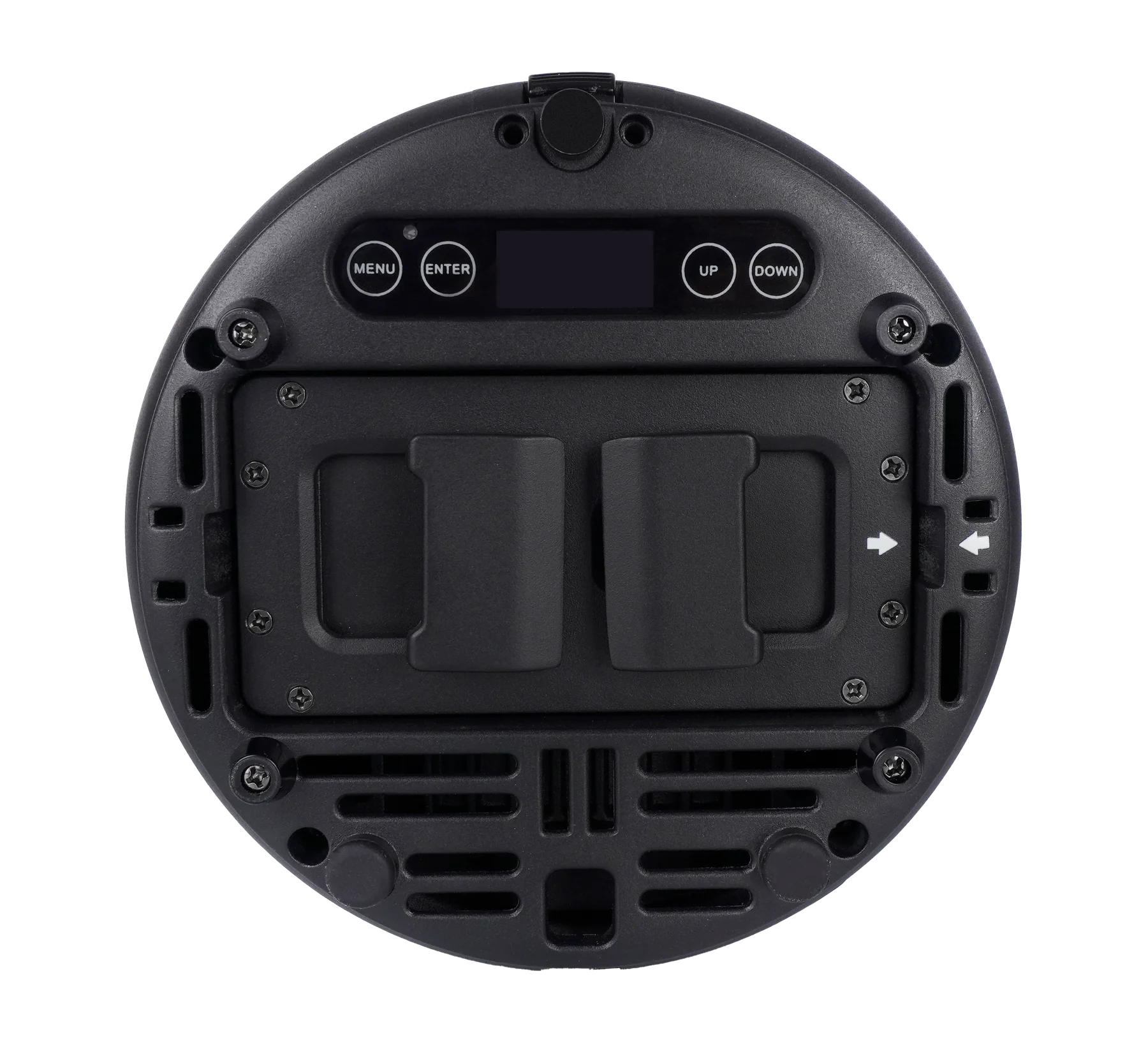
An IP65 battery uplight has an enclosure rating under defined conditions. IP65 addresses dust ingress and water jets, as explained in Schneider Electric’s IP65 enclosure reference. It does not authorize immersion.
For a removable-pack fixture, obtain the manufacturer’s required operating configuration. An open battery bay is not the assembled enclosure represented by the fixture rating. Plan exchanges in the required dry, protected environment, and follow the supplied instructions before returning the light outdoors.
Ask separately about the loose battery, charging equipment and transport enclosure. Do not extend the fixture’s IP rating to those items. Specify the expected exposure and installation conditions in the enquiry, then review the IP65 versus indoor uplight guide for the broader selection decision. Detailed P4RX reassembly checks belong in its operating procedure.
How the LumiUp Aqua P4RX Uses a Removable Battery
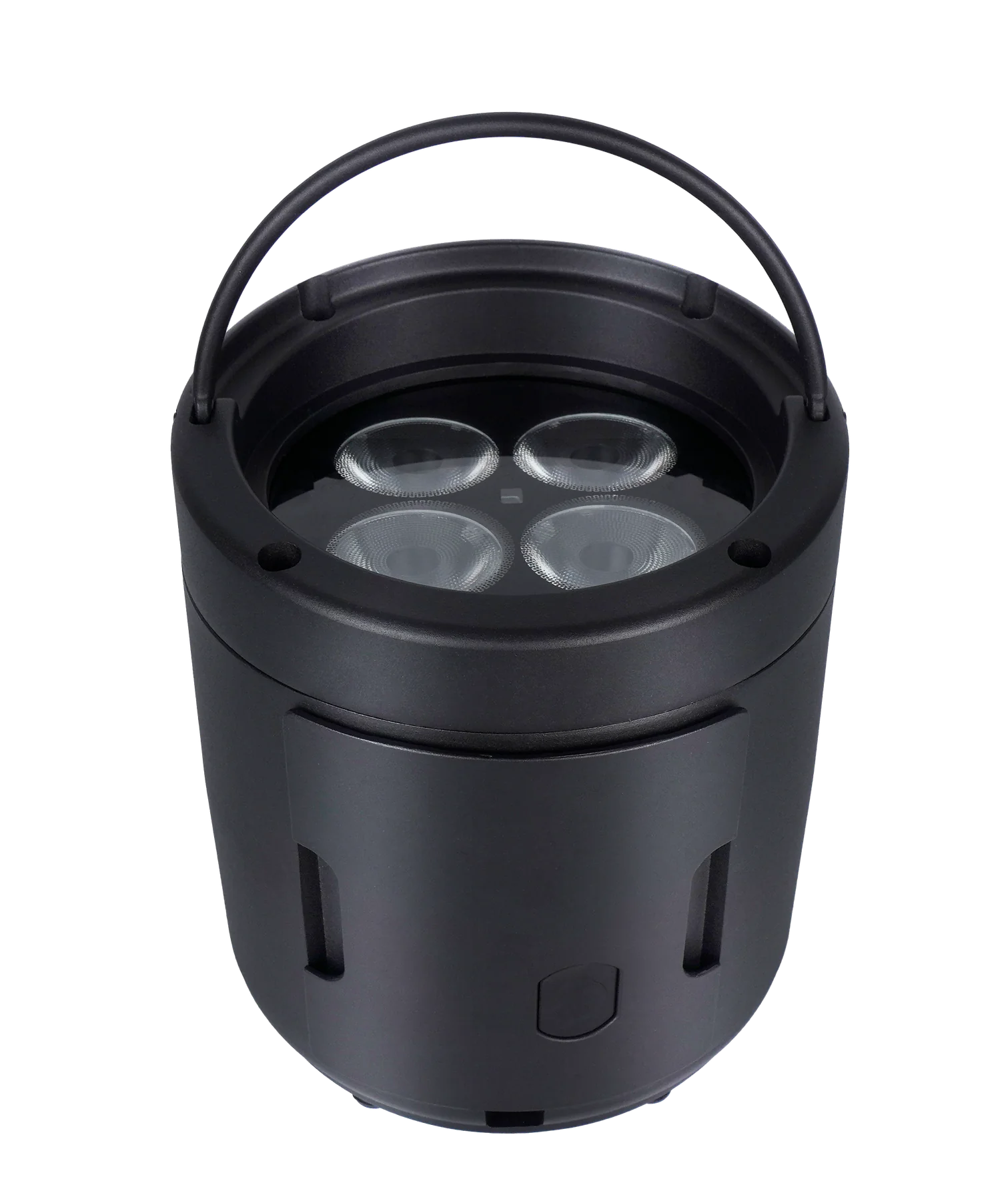
The LumiUp Aqua P4RX provides a documented product example: 4 × 20W RGBWA+UV 6-in-1 LEDs, a round IP65 fixture design, a 30° beam angle and a built-in 2.4G wireless DMX receiver/transmitter. Its latch-secured removable battery pack supports separate battery charging and tool-free latch release.
Battery replacement is a powered-off, between-run procedure. The Aqua P4RX is not described here as hot-swappable, and its IP65 rating must not be applied to an open battery bay.
Published runtime is approximately 3 hours with all LEDs on, more than 6–7 hours in automatic mode and up to 20 hours with one color diode on. These are distinct operating conditions. The longest figure does not describe full-output operation; validate the intended event scene before selecting pack quantities.
Use those facts to shortlist the model, then request the exact spare-pack and charger configuration. Battery capacity, recharge timing and accessory compatibility must come from the approved P4RX configuration, never from a neighboring Aqua model.
Request an itemized P4RX configuration
- Fixture quantity: Number of P4RX units required for the project.
- Packs included per fixture: State the supplied quantity explicitly.
- Extra packs: Quote the approved part number, quantity and availability separately.
- Approved separate charger / charging positions: Identify the charger and how many packs can charge simultaneously.
- Case option: Identify transport-only or powered charging construction; verify P4RX compatibility for the proposed option.
- Wireless control requirements: Name the intended controller, required compatible external transmitter and any separately quoted hardware.
Do not treat a charging case, extra battery packs or an external transmitter as standard equipment without evidence for the ordered configuration. The fixture’s built-in receiver/transmitter does not establish inclusion of an external control device or compatibility with another wireless protocol. Request an itemized P4RX configuration and compare the supplier’s response line by line.
Swappable Battery vs. Built-In Battery
Choose around the operating schedule and the people who will maintain the equipment. Neither architecture automatically delivers lower ownership cost.
Swipe horizontally to compare both battery architectures.
| Buying situation | Built-in battery consideration | Swappable battery consideration |
|---|---|---|
| Predictable overnight charging | Simple whole-fixture charging may be sufficient | Extra packs may add little scheduling value |
| Short gap between separate runs | Additional charged fixtures may be needed | Prepared packs can support an approved between-run exchange |
| Uninterrupted event scene | Select tested runtime for the complete window | Removability alone does not solve uninterrupted operation |
| Small venue team | Fewer separate items to manage | Confirm staff can track and handle packs correctly |
| Rental fleet expansion | Budget complete fixtures and charging positions | Budget fixtures, packs, chargers and service reserves separately |
Evaluate both configurations against the same scene, event window and contingency requirement. A sample trial should reveal whether the extra handling fits the crew’s actual schedule, not just whether a pack can be removed on a workbench.
Common Mistakes
The most expensive mismatch is buying swappable packs to solve a show that cannot tolerate a lighting interruption. Resolve the continuous operating window first. Other mistakes include counting a discharged pack as a ready spare, assuming a transport case charges its contents, and using a single-color runtime to plan a full-output scene.
Also avoid assuming that “quick-change” promises a specified exchange time or that similar-looking packs are interchangeable. Put the approved part numbers, charging arrangement and replacement conditions on the quotation. For event rental battery uplights, those details determine whether the delivered system matches the dispatch plan.
Frequently Asked Questions
Is a swappable battery the same as a hot-swappable battery?
No. Swappable means approved packs can be exchanged. Hot-swappable requires explicit manufacturer support for exchange while equipment remains operating. Unless that capability is documented, plan a powered-off replacement between runs.
Does quick-change mean tool-free battery replacement?
Not necessarily. Quick-change describes simplified access, but buyers must verify tools and the full procedure. Aqua P4RX supports tool-free latch release; its battery exchange still requires the fixture to be powered off.
Should a venue choose built-in or swappable battery uplights?
Compare the charging window, staffing and need for back-to-back runs. Built-in batteries may suit predictable overnight charging. Swappable packs may help with shorter gaps when approved replacement procedures and prepared stock fit the schedule.
Does a battery uplight with spare battery include a charger?
Do not assume so. Ask for an itemized quotation naming the fixture, installed pack, additional packs and approved charging equipment. Confirm whether separate charging is supported and whether the supplied charger serves that purpose.
Can any charging case charge removable battery packs?
No. A case may charge complete fixtures, specific detached packs or nothing at all. Physical fit does not prove charging compatibility. Obtain written confirmation for the exact fixture, pack and case combination.
How should buyers interpret the Aqua P4RX runtime figures?
Match the figure to its mode: approximately 3 hours with all LEDs on, more than 6–7 hours in automatic mode, or up to 20 hours with one color diode on. Test the planned scene with an operational reserve.
Does IP65 cover a fixture while its battery is removed?
Do not apply the assembled fixture’s IP65 rating to an open battery bay. Follow the model’s handling and reassembly instructions, and verify environmental limits for the separate pack and charger independently.
Conclusion: Review the Complete Configuration
Swappable battery uplights are most useful when the approved exchange procedure, available charging time and spare inventory fit real event runs. Specify the whole system and compare it with a built-in battery option under the same operating conditions.
Request a LumiUp configuration review with fixture quantity, event scenes, operating windows, turnaround gaps, outdoor exposure, controller details and proposed charging positions. Ask for an itemized P4RX fixture, pack and charger proposal before finalizing the purchase.